Open source · macOS and Linux · MIT license
Your BullMQ queues in one window. Your AI agents on a leash.
See what is waiting, running and failing, find why jobs fail, and retry or clean up safely, even on production. The built-in MCP server lets your agents help: reads are free, writes wait for your approval.
brew install --cask bramvanosta/tap/ranch- macOS: Apple Silicon and Intel
- Linux: deb, rpm, AppImage
- MCP server included
A closer look
What needs you comes first
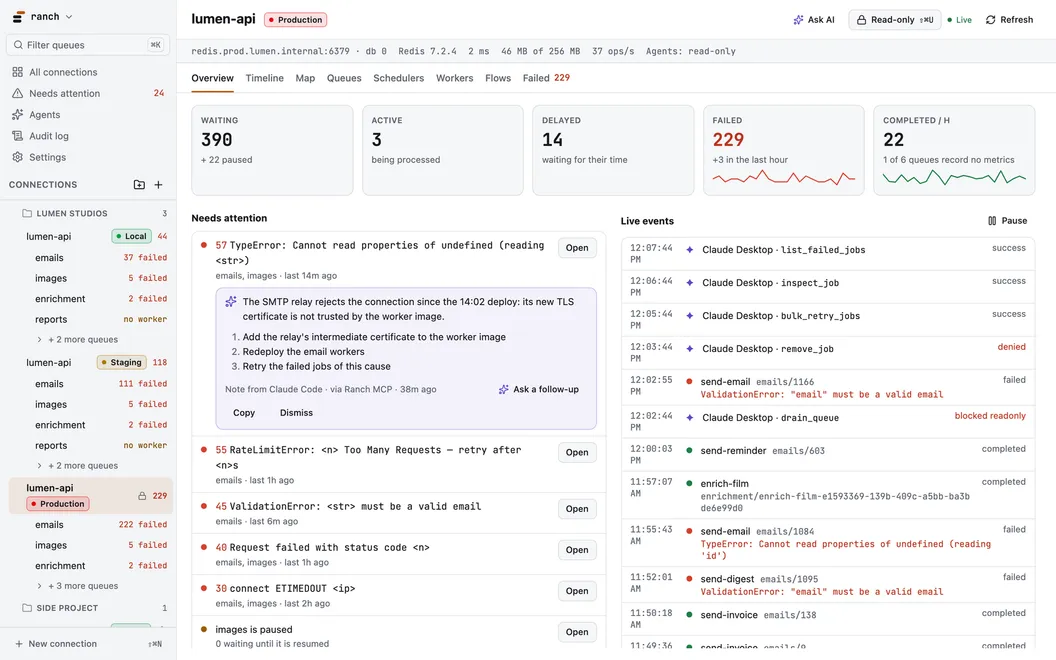
Every connection in one window: live counters, failures grouped by cause, and what your agents did, as it happens.
Why Ranch
Built for the queue that just broke
Failures grouped by cause
Reasons that only differ by their values fold into one group, with its count, job types and last 24 hours. Retry or remove the whole group at once.
Safe on production
Read-only until you unlock it, a count and a confirmation before every destructive action, and every write in an audit log.
Down to the job
Payload, options, progress, stack traces, logs, and its flow as a graph. Retry, promote or remove, also in bulk and across queues.
Every way to reach Redis
redis:// and rediss:// URLs, TLS with a custom CA, SSH tunnels. Secrets stay in the OS keychain.
Writes are BullMQ-exact
Lua scripts ported from BullMQ’s own, proven in CI against real BullMQ 5.x and 6.x workers.
⌘K or Ctrl+K reaches everything
Queues, connections, pages, actions and jobs by id, from one palette.
AI agents
Reads are free. Writes wait for you.
Ranch ships an MCP server, ranch-mcp, set up in one click in the most common AI clients.
- A write opens an approval in Ranch: what it would do, to how many jobs, the exact call.
- Sensitive fields are masked by default before anything reaches the agent.
- An agent that finds why jobs fail attaches its diagnosis to the cause.
- Every write, yours and your agents’, lands in the audit log.
Install
macOS, Linux, or a container
macOS
One universal app for Apple Silicon and Intel. It updates itself, only when you click.
brew install --cask bramvanosta/tap/ranchGet the .dmg from the latest release
Linux
x86_64. Needs a Secret Service provider: GNOME Keyring, KWallet or KeePassXC.
sudo apt install ./Ranch_*_amd64.deb      # Debian, Ubuntu
sudo dnf install ./Ranch-*.x86_64.rpm     # Fedora, RHEL
chmod +x Ranch_*.AppImage && ./Ranch_*.AppImage
Get the .deb, .rpm or AppImage from the latest release
Ranch server
The same UI over HTTP, for the places a desktop app does not go: next to a staging Redis, in a compose stack, in a cluster.
# Once: the key that encrypts the passwords Ranch stores. Keep this file.
(umask 077 && openssl rand -base64 32 > ranch-secret.key)

docker run -d --name ranch -p 127.0.0.1:8080:8080 -v ranch-data:/data \
  -e RANCH_PASSWORD='choose-one' -e RANCH_SECRET_KEY="$(cat ranch-secret.key)" \
  ghcr.io/bramvanosta/ranch:latest
Server guide: TLS, sign-in with OIDC, configuration
Open your queues in Ranch
Free and open source, under the MIT license. For macOS and Linux, or as a server.